
- 0
- 3,356 words
REDMOND, WA – May 13, 2026 – Microsoft has announced a significant evolution in its AI strategy for the Edge browser, effectively retiring the standalone "Copilot Mode" in favor of deeply embedding its intelligent functionalities directly into the browsing experience across both desktop and mobile platforms. This strategic pivot signals Microsoft’s intent to weave artificial intelligence seamlessly into every facet of user interaction, transforming Edge from a mere web browser into a proactive, intelligent assistant.
The move, detailed in recent updates from the Microsoft Edge Dev team, means that users will no longer need to activate a specific "Copilot Mode" to leverage the browser’s advanced AI capabilities. Instead, features like cross-tab information synthesis, intelligent summarization, and AI-powered content generation are now native functions, accessible whenever and wherever a user needs them. This integration reflects a broader industry trend towards pervasive AI, where intelligent assistance is an inherent part of the software, rather than an add-on.
A Paradigm Shift in Browser-AI Interaction
For years, web browsers have primarily served as gateways to the internet, tools for information retrieval and content consumption. With the advent of large language models (LLMs) and generative AI, this paradigm is undergoing a profound transformation. Microsoft, a leader in AI research and development, is at the forefront of this shift, positioning Edge not just as a browser, but as a sophisticated digital companion. The retirement of "Copilot Mode" is less about removing a feature and more about elevating its status—making it an omnipresent layer of intelligence that enhances productivity, accessibility, and user engagement without requiring explicit activation.
The core of this transformation lies in the user experience. By eliminating the need to toggle a specific mode, Microsoft aims to make AI assistance feel more intuitive and less like a separate tool. Whether a user is conducting research across multiple tabs, drafting an email, or simply trying to understand complex information on a webpage, Copilot’s capabilities are now implicitly available, ready to assist with a simple query or command. This seamless integration is designed to reduce friction and accelerate workflows, aligning with Microsoft’s vision of "AI for everyone."
The Core of the Transformation: Seamless Integration Over Dedicated Modes
The initial "Copilot Mode" was introduced as an experimental feature, a dedicated space where users could interact with AI to perform specific tasks. While valuable for testing and initial user feedback, the concept of a "mode" inherently suggested a separation from the regular browsing experience. Microsoft’s latest update dissolves this boundary. Now, the functionalities previously confined to "Copilot Mode"—such as the ability to search for information across multiple open browser tabs and analyze details on each page—are universally available.
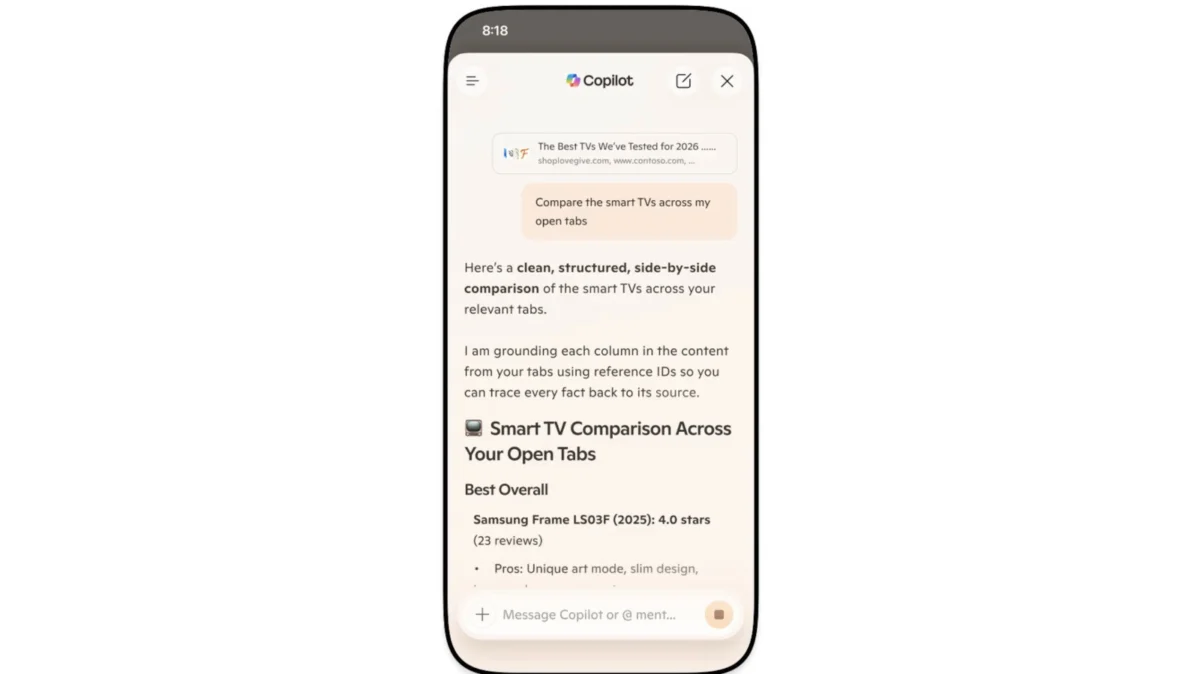
This means a user can, for instance, ask Copilot, "Compare the smart TVs across all my open tabs," and receive a structured, side-by-side comparison analysis, drawing information directly from all active browser windows. This capability, once a highlight of the dedicated mode, is now an inherent part of the Copilot experience within Edge, accessible directly from the Copilot sidebar or through contextual commands. The expansion of these features to mobile devices further underscores Microsoft’s commitment to delivering a consistent, AI-powered browsing experience across all platforms.
A Journey Through AI Evolution: The Chronology of Edge’s Copilot
Microsoft’s journey with AI integration into its products, particularly Edge, has been a meticulously planned and progressively rolled out endeavor. The evolution of Copilot within Edge reflects a broader strategic push by the company to infuse artificial intelligence into its entire ecosystem, from Windows to Microsoft 365.
Early Explorations: Testing the Waters with "Copilot Mode"
The initial foray into a dedicated AI browsing experience began in July of last year. Microsoft commenced testing what it termed "Copilot Mode" within Edge. This experimental phase allowed a subset of users to engage with a nascent AI assistant capable of performing specific tasks. At its core, this early iteration of Copilot Mode enabled users to:
- Search for information across multiple open browser tabs: A significant leap from traditional single-tab search, allowing for more holistic research.
- Analyze details on each page: Providing summaries, extracting key points, and offering contextual understanding of web content.
This testing period was crucial. It allowed Microsoft to gather invaluable user feedback on the utility, performance, and user interface of an AI-powered browsing assistant. It was during this phase that the company began to understand the potential for AI to move beyond simple search and into more complex information synthesis and task automation.
Expanding Horizons: The Introduction of "Journeys" and Enhanced Capabilities
Following the initial success and insights gained from Copilot Mode testing, Microsoft began to expand the AI’s capabilities, introducing new features designed to enhance productivity and organization. One notable addition was "Journeys." Rolled out sometime after the initial Copilot Mode trials, Journeys addressed a common pain point for users: managing ongoing projects or research topics across multiple browsing sessions.
Journeys allowed users to save and revisit specific projects, effectively creating a persistent context for their browsing activities. Whether planning a trip, researching a major purchase, or compiling information for an academic assignment, Journeys provided a centralized hub to store relevant tabs, notes, and AI-generated insights. This feature marked a significant step towards a more proactive and memory-enabled AI assistant, capable of understanding and supporting long-term user goals.
The Present: Full Integration and Cross-Platform Parity
The current announcement represents the culmination of these developmental phases. The decision to retire the distinct "Copilot Mode" is a natural progression, signifying that the AI functionalities are no longer experimental features but core components of the Edge experience.
Key aspects of this latest integration include:
- Universal Availability: All Copilot features, including the original cross-tab search and analysis, are now built directly into the browser, accessible without needing to activate a special mode.
- Desktop and Mobile Parity: A major focus has been on achieving feature parity across devices. What was once primarily a desktop experience is now fully available on Edge for mobile. This means users can seamlessly transition between devices, picking up their research or projects exactly where they left off.
- Expanded Feature Set: Alongside the integration, Microsoft has introduced several new, powerful AI tools and enhancements, further cementing Copilot’s role as an indispensable browsing assistant.
This chronological progression demonstrates Microsoft’s methodical approach to AI integration, starting with focused experimentation, expanding into broader utility, and finally achieving deep, ubiquitous integration across its platform.
Unpacking the Enhanced Copilot Experience: Features Redefined
The transition from a distinct "Copilot Mode" to a fully integrated AI experience brings with it a suite of powerful, redefined features. These capabilities are designed to make web browsing more intelligent, productive, and accessible, catering to a diverse range of user needs.
Intelligent Information Synthesis: Beyond Simple Search
The foundational promise of Copilot—to go beyond basic keyword searches—is now universally available. Users can leverage Copilot to:
- Synthesize information across multiple open tabs: This is particularly valuable for research, comparative shopping, or in-depth analysis. Instead of manually sifting through numerous pages, Copilot can rapidly extract, summarize, and compare relevant data points.
- Analyze page details: Copilot can quickly provide summaries of lengthy articles, identify key arguments, or explain complex concepts found on a webpage. This feature is a significant time-saver, allowing users to grasp the essence of content without exhaustive reading.
The ability to process and cross-reference information from multiple sources simultaneously elevates Edge from a passive content viewer to an active knowledge processor.
"Journeys": Persistent Productivity Across Devices
The "Journeys" feature, previously rolled out, now sees a significant enhancement with its free availability on mobile. Journeys allows users to:
- Save and organize ongoing projects: Whether it’s planning a vacation, researching a new gadget, or compiling data for a work project, Journeys keeps all related tabs and AI-generated insights organized.
- Seamless cross-device access: The mobile integration means users can start a project on their desktop, pause, and then effortlessly pick up exactly where they left off on their smartphone or tablet days or even weeks later. This continuity is crucial for modern, multi-device workflows, ensuring that valuable research and context are never lost.
Journeys transforms the browser into a personalized project management tool, powered by AI that understands and remembers user intent over time.
Vision and Voice: A New Dimension of Accessibility and Interaction
One of the most innovative new features is the "Vision and Voice" capability, now available on mobile. This feature offers a revolutionary way to interact with web content:
- Share the screen with Copilot: Users can literally "show" Copilot what they are seeing on their Edge screen.
- Talk through content with the assistant: Using natural spoken language, users can ask questions or give commands related to the visual content on their screen. For example, "What is this product?" or "Summarize the key points of this infographic."
- Receive audio replies: Copilot responds verbally, providing a truly hands-free browsing experience.
This feature significantly enhances accessibility for users with visual impairments or those who prefer auditory learning. It also boosts productivity for multitasking, allowing users to interact with their browser while engaged in other activities, such as cooking, exercising, or driving.
Memory and Context: A Smarter, More Responsive Assistant
Microsoft has equipped Copilot with enhanced long-term memory on both desktop and mobile. This means Copilot can:
- Recall and reference previous chats: The assistant remembers past conversations, allowing for more natural and continuous interactions without needing to repeat context.
- Tap into browsing history (with user consent): Copilot can leverage a user’s browsing history to provide more relevant and personalized assistance. This could involve picking up research started previously, returning to a social media thread, or checking out an item a user has been considering. The "if you want to" clause emphasizes user control over this powerful, yet sensitive, capability.
This intelligent memory transforms Copilot into a truly personal assistant, capable of learning from past interactions and providing contextually relevant help.
Empowering Learning: The "Study and Learn" Mode
For students, lifelong learners, and anyone seeking to deepen their understanding of a topic, the new "Study and Learn" mode is a game-changer:
- Transform references into guided study sessions: By simply having reference tabs open, users can prompt Copilot with "Quiz me on this topic."
- Generate interactive quizzes: Copilot will then create a personalized quiz based on the content across the open tabs, complete with questions and answers, turning passive reading into active learning.
This feature leverages AI to create a dynamic and personalized educational experience, making studying more efficient and engaging.
Streamlining Communication: The "Writing Assistant"
The "Writing Assistant" feature is designed to aid in various writing tasks, from crafting emails to generating creative content:
- Generate drafts: Copilot can quickly produce initial drafts based on user prompts.
- Rewrite existing text: Users can ask Copilot to rephrase sentences or paragraphs for clarity, conciseness, or impact.
- Adjust the tone as needed: A key functionality allows users to specify the desired tone—professional, casual, persuasive, empathetic—and Copilot will adapt the writing accordingly.
This assistant is invaluable for anyone who frequently writes, offering a powerful tool to overcome writer’s block, refine prose, and ensure messages resonate with their intended audience.
Auditory Engagement: Transforming Tabs into Podcasts
A unique and highly convenient feature is the ability to turn open tabs into a podcast:
- Convert text content into spoken audio: Users can effectively "listen" to their open web pages.
- Ideal for multitasking: This allows users to consume content while commuting, exercising, or performing other tasks where visual attention is limited.
This feature, currently exclusive to English-speaking markets, represents a new frontier in content consumption, making information more accessible and adaptable to modern lifestyles.
A Redesigned Mobile Experience
Finally, Edge on mobile is also receiving a significant user interface overhaul. It will now feature the desktop version’s redesigned tab page, which includes:
- Easily accessible Journeys: Integrating the project management feature directly into the tab page for quick access.
- Streamlined navigation: A more intuitive layout designed to enhance the mobile browsing experience, making it easier to manage tabs and access AI features on the go.
This redesign underscores Microsoft’s commitment to providing a consistent, feature-rich, and user-friendly experience across all devices.
Microsoft’s Vision and User Empowerment
The comprehensive integration of Copilot into Microsoft Edge is not merely a technical update; it represents a significant step in Microsoft’s broader vision for the future of computing, where AI is an omnipresent and intelligent partner in daily digital life.
The "AI for Everyone" Mandate
Microsoft has consistently articulated a vision of "AI for everyone," aiming to democratize access to advanced artificial intelligence capabilities. By embedding Copilot directly into Edge, a widely used browser, the company is making sophisticated AI tools accessible to a vast user base without requiring specialized knowledge or additional software. This strategy aims to empower individuals and organizations to achieve more, fostering creativity, productivity, and informed decision-making. The transition from a "mode" to an inherent feature reinforces this commitment, making AI an invisible yet powerful force in the user’s workflow.
Prioritizing User Control and Customization
Despite the pervasive nature of these new AI capabilities, Microsoft is keenly aware of user preferences and concerns regarding automated assistance. A crucial aspect of this rollout is the emphasis on user control. Microsoft explicitly states that users are not obligated to utilize any of Copilot’s functions if they prefer not to.
- Customizable Copilot Experience: Users can navigate to their Edge browser settings to tailor their Copilot experience. This allows individuals to selectively enable or disable specific features, ensuring that the AI assistance aligns with their personal comfort level and workflow.
- Opt-in for Sensitive Features: Features like tapping into browsing history or remembering previous chats are presented with an emphasis on user consent. This opt-in approach is designed to build trust and assure users that their data and privacy are respected.
This commitment to user choice is vital in an era where AI integration can sometimes feel overwhelming or intrusive. By providing granular control, Microsoft aims to empower users to shape their AI-assisted browsing experience according to their needs.
Addressing Privacy and Data Management
The integration of an AI assistant with capabilities such as accessing browsing history and maintaining long-term memory naturally raises questions about data privacy and security. While the original article provides limited explicit details on Microsoft’s privacy protocols for these new features, it’s understood that Microsoft operates under stringent data governance policies.
Typically, Microsoft emphasizes:
- User Consent: As highlighted, features that access sensitive data like browsing history require explicit user permission.
- Data Minimization: AI systems are generally designed to process only the data necessary to perform the requested task.
- Anonymization and Aggregation: When data is used for model improvement, it is often anonymized or aggregated to protect individual identities.
- Transparency: Microsoft aims for transparency regarding how user data is collected, used, and stored by its AI services.
For an AI that remembers past chats and can delve into browsing history, robust privacy safeguards and clear communication to users about data handling practices are paramount to maintaining trust and encouraging adoption. The ability to customize and disable features also serves as a direct mechanism for users to manage their privacy preferences effectively.
Broader Implications: The Future Landscape of Web Browsing
The deep integration of Copilot into Microsoft Edge signifies more than just a product update; it heralds a potential paradigm shift in how users interact with the internet and their digital tools. The implications extend across user experience, competitive dynamics, and even ethical considerations.
Reshaping User Expectations and Productivity
The most immediate implication is the profound impact on user expectations. As AI-powered features become commonplace in Edge, users will likely begin to expect similar levels of intelligence and assistance from other applications and browsers. The ability to automatically summarize, compare, generate, and organize information reduces cognitive load and saves significant time.
- Enhanced Productivity: Features like the Writing Assistant and cross-tab analysis directly boost productivity by automating mundane tasks and accelerating information processing.
- Reduced Friction: The seamless nature of the integrated AI means less effort required to switch contexts or tools, leading to a more fluid and efficient workflow.
- Personalized Experience: With long-term memory and access to browsing history (with consent), Copilot can offer increasingly personalized and relevant assistance, making the browsing experience more tailored to individual needs.
This evolution is poised to redefine what "efficient browsing" means, moving beyond mere speed to intelligent assistance.
Competitive Dynamics in the Browser Market
The browser market is fiercely competitive, dominated by Google Chrome, with significant players like Mozilla Firefox, Apple Safari, and Brave also vying for market share. Microsoft’s aggressive AI integration into Edge places significant pressure on these competitors.
- Innovation Race: Other browser developers will likely feel compelled to accelerate their own AI integration strategies to keep pace. This could lead to a rapid innovation race, benefiting users with more intelligent browsing options.
- Differentiating Factor: For Microsoft, Copilot’s deep integration serves as a powerful differentiator. While other browsers might offer AI extensions, Edge is positioning its AI as an intrinsic part of the core browser experience, offering a more cohesive and potentially superior user experience.
- Ecosystem Advantage: This move further strengthens Microsoft’s broader AI ecosystem, making Edge a more attractive entry point into the company’s suite of AI-powered tools, including Windows Copilot and Microsoft 365 Copilot.
The battle for browser dominance may increasingly be fought on the battleground of AI capabilities.
The Interconnected Microsoft AI Ecosystem
Edge’s enhanced Copilot is not an isolated product; it is a critical component of Microsoft’s overarching AI strategy. The consistent branding and shared underlying AI models (like GPT-4) mean that the Copilot experience in Edge will feel familiar and integrated with Copilot in Windows and Microsoft 365 applications.
- Unified AI Experience: This creates a unified AI assistant experience across Microsoft’s most important platforms, allowing users to transition seamlessly between tasks in their browser, operating system, and productivity apps, all supported by the same intelligent agent.
- Data and Learning Synergy: While respecting privacy boundaries, there is potential for insights gained from one Copilot interaction to inform another, leading to a more intelligent and context-aware assistant across the entire Microsoft ecosystem.
This synergistic approach positions Microsoft to offer a truly comprehensive and intelligent digital environment.
Ethical Considerations and the Evolving Role of AI
As AI becomes more deeply integrated into daily tools, ethical considerations become increasingly important.
- Accuracy and Bias: While AI models are powerful, they are not infallible. Concerns about the accuracy of AI-generated summaries or comparisons, and the potential for embedded biases, remain relevant. Microsoft, like other AI developers, invests heavily in responsible AI development, but continuous vigilance is required.
- Information Overload vs. Simplification: While AI aims to simplify information, an over-reliance on AI summaries might inadvertently reduce critical thinking or exposure to diverse perspectives. Striking the right balance is crucial.
- Data Privacy and Security: As discussed, the ability of AI to access browsing history and maintain long-term memory necessitates robust privacy controls and transparent data practices to maintain user trust.
- Digital Divide: The benefits of advanced AI features might not be equally accessible to all, potentially exacerbating the digital divide for those with limited access to technology or digital literacy.
Microsoft’s continued emphasis on user control and responsible AI development will be key to navigating these evolving ethical landscapes.
Conclusion: A Glimpse into the Next Era of Browsing
The retirement of "Copilot Mode" in Microsoft Edge marks a pivotal moment in the evolution of web browsing. It signifies a future where artificial intelligence is not an optional extra, but an intrinsic, always-on component of the digital experience. By deeply embedding sophisticated AI functionalities like intelligent summarization, cross-device project management, voice interaction, and personalized learning tools, Microsoft is transforming Edge into a powerful, proactive assistant.
This strategic move enhances productivity, boosts accessibility, and sets a new benchmark for what users can expect from their browsers. While the transition brings with it important considerations regarding user control, privacy, and ethical AI development, Microsoft’s commitment to customization and responsible innovation suggests a path towards an increasingly intelligent, personalized, and seamless digital future. The era of the "smart browser" is not just arriving; it’s becoming the new standard.
Author

Related Posts

The CW and ESPN Solidify ACC Partnership Through 2031, Cementing Free Sports Access and Streaming Synergy
- 0
- 3,968 words
Main Facts The CW Network, in a significant move underscoring its aggressive expansion into live sports broadcasting, has announced a renewed sublicense...
Read out all
The Rise and Fall of Skydweller: A Pioneering Solar Aircraft’s Tragic End and Enduring Legacy
- 0
- 1,774 word
The skies recently witnessed the dramatic conclusion of a remarkable chapter in aviation history. Skydweller Aero’s innovative solar-powered drone, a technological marvel...
Read out all
BitMar: A Digital Mirage Promising Legal Streaming, Delivering Deception
- 0
- 1,956 word
A closer examination of the online streaming service BitMar reveals a pattern of deceptive marketing and a business model that appears to...
Read out all
Detroit Pistons Forge Landmark Local Broadcast Deal with Scripps Sports, Bringing Games Back to Free Over-the-Air Television
- 0
- 2,085 words
DETROIT, MI – April 22, 2026 – In a move set to dramatically expand access for their devoted fanbase, the Detroit Pistons...

Broadcasting+Cable Hall of Fame Unveils Trailblazing 2025 Class: A Celebration of Enduring Influence and Innovation
- 0
- 3,003 words
NEW YORK, NY – The Broadcasting+Cable Hall of Fame, widely recognized as the preeminent industry event honoring the visionary leaders, groundbreaking innovators,...

The $300 Chip: Qualcomm’s Price Hikes Threaten to Push Android Flagships into a "Ludicrous Era"
- 0
- 2,325 words
San Diego, CA – May 13, 2026 – The escalating cost of a single, crucial component – the System-on-a-Chip (SoC) – is...
Read out all